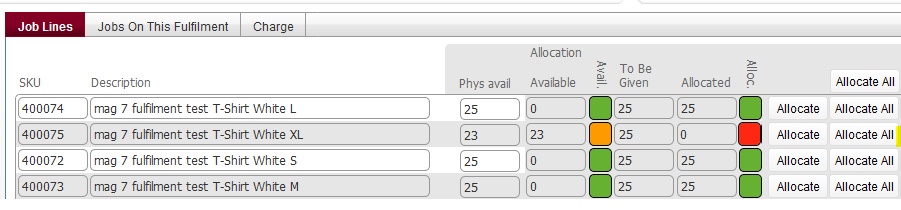
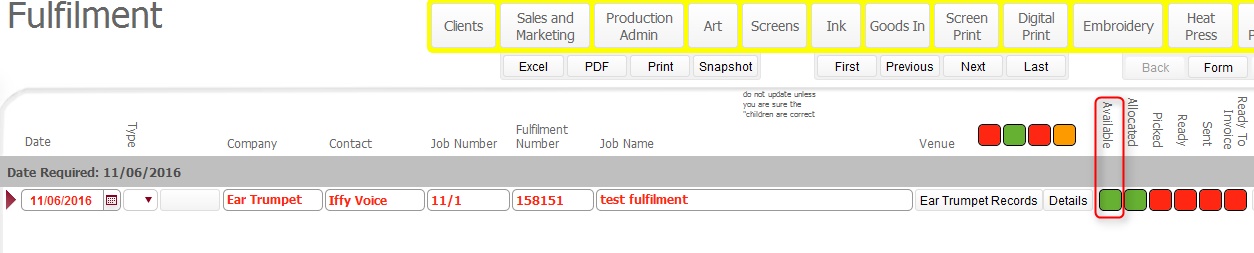
The below is written before the actual code is deployed, so may change at that point. Additionally, the screenshots in the below have been mocked up to illustrate the accounting that occurs between allocated amount, physical amount and available amount and how this interacts with the Available to Pick status light.
There may be situations where the quantity of an item (or items) required on a fulfilment is in excess of what is physically available to pick.
In these circumstances, the available to pick light will be Amber
It is important to understand how the stock accounting system in strokeone works, as this will aid your understanding in identifying what action to take in these
Maximum Quantity that can be ordered on Fulfilment
When items are added on a fulfilment, the maximum amount that can be ordered (the To Be Given amount) is a maximum of the sum of Physically Available in Warehouse balance plus the In Production quantity. What this means, is that on a fulfilment, customers can order items that are not yet manufactured.
Accounting relating to fulfilments
Leading on from this, it is important to understand the following
For fulfilments created in house, or via web orders :-
Ordered items are always allocated in an amount equal to the To Be Given figure.
When stock is allocated it debits the Available balance by the same amount.
When In Production stock is successfully manufactured, Data entry is done, which causes the following updates:-
Clears the In
Production (expected)
balance
and
Credits the Available balance and
Credits the Physically Available balance
by the quantity that is actually manufactured
This therefore can lead to situations where there is a negative Available balance for an item where the quantity ordered is against quantities that are expected. That is, it is in excess of the Physical Available balance.
In the normal course of events, once the expected items are successfully manufactured, the quantity produced will credit the available to pick (and physical available balance), and bring the situation back into proof.
Composition of the Available to Pick light
The Available to Pick status light is based on a comparison of the Physical available balance versus To Be Given figure
Now that we've outlined the background to this, let's work through a practical example,
Let's consider the following example
A customer order comes to decorate 100 T shirts front and back (in a 25 S/M/L/XL breakdown)#
Once produced, these T shirts need to be delivered to client address
The job order is written up to decorate the blank garments, i.e. produce the decorated SKU's
A fulfilment is created for this delivery, and the decorated SKU's are added per the customer order.
Specifically, the To Be Given quantity
is set as 25 per item, and they are fully allocated
As these SKU's do not yet exist, there is no physical balance for them,
and the order is realistically being placed against In Production (expected)m
amounts.
Available balance is therefore
negative, as it is made up of Physical
Available balance (which is zero), minus
amount allocated (which is 25
in this example), and thus is minus 25
for each item on the fulfilment.
.
Available to Pick Lamp on Fulfilment Layout
The Available to Pick status lamp on the fulfilment layout, is based on the comparison of the Physical Available position (which is zero) for each of the items on the fulfilment versus the To Be Given figure (25 for each of these)
As the Physically Available position is zero for all of the fulfilment items, then the Available to Pick status lamp is Red.
This means none of the items are available to pick.

Let's advance the workflow to see what happens when the decorated garments are produced.
The order was for 100 shirts, printed front and back, and there was
a zero Physical Available balance of the decorated SKU.
Let's assume that there were two rejects encountered during production,
and only 98 shirts were produced.
This is recorded in the Data Entry
form.
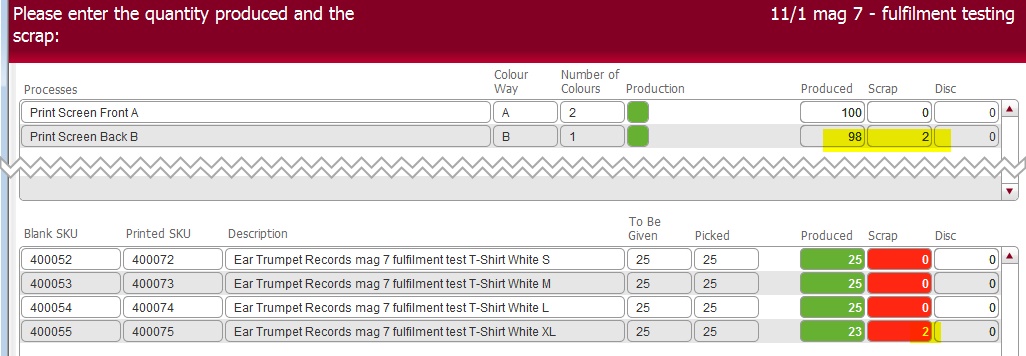
As you can see, only 23 of the Extra Large SKU 400075 were successfully produced.
In stock accounting terms, this will credit the Physical Available balance for SKU's 400072, 73 and 74 by 25; and SKU 400075 by 23.
Let's see how this affects the Fulfilment Available
to Pick light
This now shows as Amber as for one or more of the items, the Available to Pick Balance is less than the To Be Given amount.
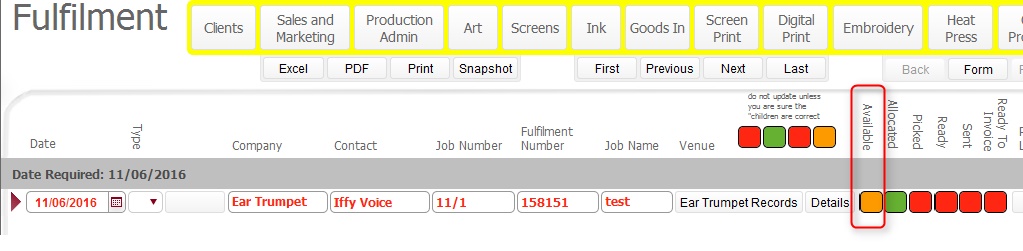
Clicking on the Details button
will provide more details
Here we can see the Available to Pick
status for each item on the fulfilment,
and can see that for SKU 400075, the Physical
Available position (of 23) is less than the To
Be Given figure. Additionally, we can see a negative Available
position, and know that data entry has been done, and there is no more
of this sku expected.

There is genuinely a shortfall of this item, and as no more will be manufactured, the quantity ordered for this sku needs to be reduced.
To do this, the following steps are necessary:-