Marking a Heat Press Process as Finished
Background
When a heat-press run finishes on the factory floor, several things happen:-
- The (now) decorated garments are removed from the heat-press machine
-
- Note that they may need to be subject to further processing before the whole job order is finished. (for example, they might need to be individually bagged or labelled)
- The heat-pressed output is counted and any spoilage for the process noted
- If the heat-press process is the final completed process for the job order - then the final quantity produced (and spoiled) for the whole job order is recorded.
About this task
This topic will instruct you how to update strokeone to mark that the above activities have occurred.
Prerequisites
Ensure that you have opened the Heat Press Process Layout for the machine which is undertaking the heat-pressing.
Procedure
- Locate the record for the heat-press process that you wish to record as finished..
Tip: The Production status icon will be in an In Progress (Amber).
- Click the Finish button for the record identified in step 1)
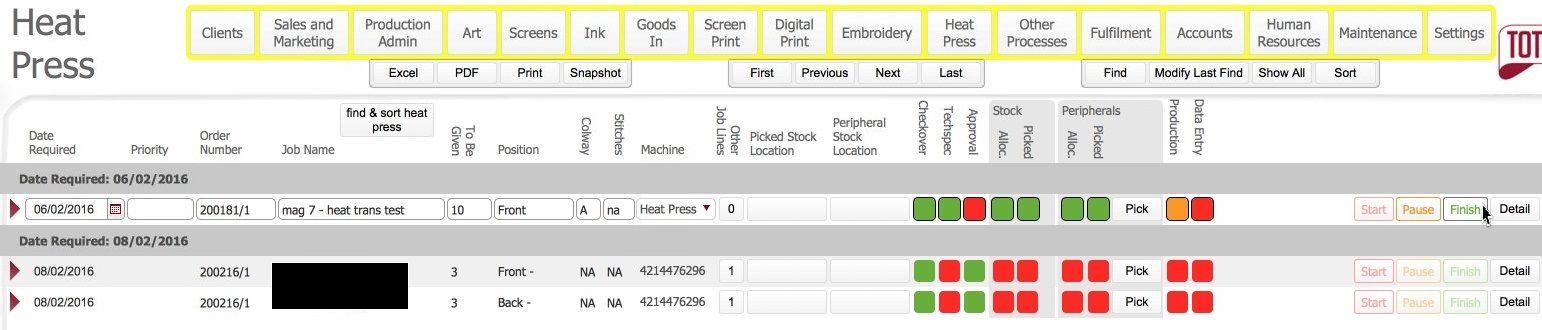
- The following updates occur:-
- The process line Production status updates to Green (Completed)
- The Pause button disables.
- The Finish button disables.

-
You need to record the numbers of items successfully processed in the Data Entry form.
Related Topics
Heat Press Process Layout
Data Entry at the end of a Production process