Vendor Site Basics
Please note the following information with regards to our Vendor Site.
Inactivity Time Out
Sessions are automatically closed after 15 minutes of inactivity. This ensures that the service remains as performant as possible for all users.
After 15 minutes of inactivity, you will see the following warning prompt in your browser.
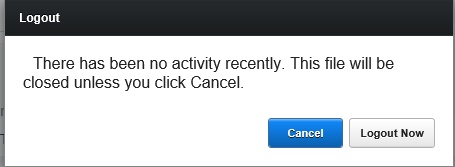
- Click Cancel to reset the warning, and continue with your session.
- If you do nothing, or click Logout Now, your session will close and you will be logged out.
Searches
In various pages within our Vendor Site, you need to enter criteria when searching for records.
Please bear the following in mind when searching for items:-
- Search criteria act in conjunction with each other.
For example, if you search for a delivery based on Venue and Sent status, then only records which match both criteria will be returned.
In other words, logically, search criteria act as And operands.
- When searching by Date fields, if only one date in a date range is defined, then the range is interpreted as a single date, and only those records which match the single defined date are returned.
For example, if you enter 24 April 2015 in the Date From field, and leave Date To blank, then only matching records with a date of 24 April 2015 are returned. The same functionality works if only Date To was populated. To search for records between a period, ensure you enter both the Date From and the Date To fields..
- Speed of search is linked to the scope of the data set requested.
In order to maximise the speed of your search, please define as many criteria as possible.
For example, if using dates in a search, use narrow date ranges, or specify a date range in conjunction with other criteria, so that the query executes in a performant manner.
- Search criteria are case insensitive. Name values entered as peter or Peter or even PeTEr, are interpreted as strings and treated identically.
- Search results can be exported locally to your computer as comma separated value "csv" files.
CSV files can be opened and manipulated on your computer in applications such as Microsoft Excel.
(See Note 1 below)
- Certain result data can be saved locally to your computer as Portable Document Format "PDF" files. Again, once saved locally, you can open, and print these files from with PDF compliant reader software, such as Adobe Reader installed on your computer. Similarly you can attach these to an email message as you would any file.
(See Note 1 below)
Notes:-
- Depending on which particular browser you are using, how it is configured, your computer's operating system, and the applications you have installed and configured as default programs, when you save a file locally from the Vendor site, it may (or may not) automatically open with an associated application.
- If it does not open automatically, the file will have been saved in file download location defied in your browser' , and you can open it from there with an suitable application capable of reading the file format.
Please refer to your browser's documentation for information regarding its default download location.
Related Topics
Home Page