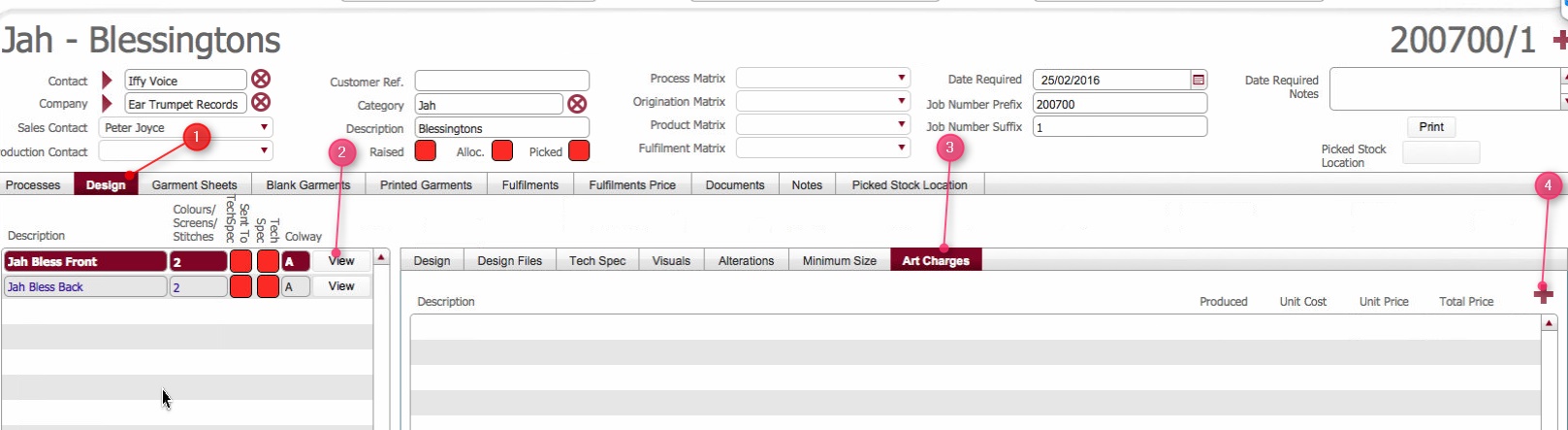
(Note: In the below sections/text, the numbers in (bold parenthesis) refer to the annotations in the above screen-shot)

When a job order has a process line that requires Artwork there are invariably ArtWork related costs - such as the effort required to Originate the Art Work imagery.
These costs need to be recorded so that they will form part of the invoice that is billed to the client.
Sometimes the ArtWork costs are known at the time the job is written up as they have been prior agreed between the parties. In such circumstances, the Art Department will likely be responsible for checking that the captured costs are commensurate with the effort involved in originating the Art Work and if not, liaising with the client and / or sales person and agreeing to supplement / amend these charges as applicable. What is essential in such a situation is that deviations from up front agreed charges are communicated and agreed between the parties to mitigate any invoice disputes.
Alternatively, definitive ArtWork costs may not be known at the time the job order creation, and therefore they will need to be recorded by the Art department.
It is imperative that artwork costs are agreed with the client and accurately
recorded, so that when the client is invoiced for the fulfilment, there
will be no disputed charges.
See Understanding
the importance of Recording Costs for more information.
This topic outlines how to add Art Work related costs on a job order.
Ensure that you have opened the relevant Job
order detail form that you want to record (or check ) Art Work charges
on.
(Note: In the below sections/text, the numbers in (bold parenthesis) refer to the annotations in the above screen-shot)
Field |
Comments |
| Description | Click to select the applicable type
of charge from the drop-down
list. For example Origination or Art Work Hours. |
| Produced | Enter the numeric quantity of units for the type of charge. |
| Unit Cost | Enter here the internal cost for a single unit of the charge
type. Note: Unit Costs refers to the internal cost for the type of charge, whereas Unit Price is the cost per unit that will be invoiced to the client. Capturing this level of information allows you to monitor margin levels. |
| Unit Price | Enter here the cost that you will charge the client for a single
unit of the charge type. TBC: The expectation is that in the future, the prices will default here based on artwork |
| Total Price | Calculated field: Produced * Unit Price |
Related Topics