Granting Contacts Access to Vendor Site
Background
The Totally Orginal Tracker
website is an optional addition to the main strokeone application and provides
a series of system functionalities in an easy to use website that is accessible
to suitably permissioned users via a browser.
The permission for users to access the Totally Orginal Tracker
site is granted within the main strokeone application.
Prerequisites
In order to grant access to the Totally Orginal Tracker
website, ensure that the following has occurred:-
- The contact has been created in strokeone
- An email address for the
contact has been recorded.
(a contact's email address functions as their user id for accessing
the Website)
About this Task
This topic will instruct you how to grant a client contact access to
the Totally Orginal Tracker
website.
It assumes that the client has not already been configured with access
Procedure
- Open the detail form for
the contact.
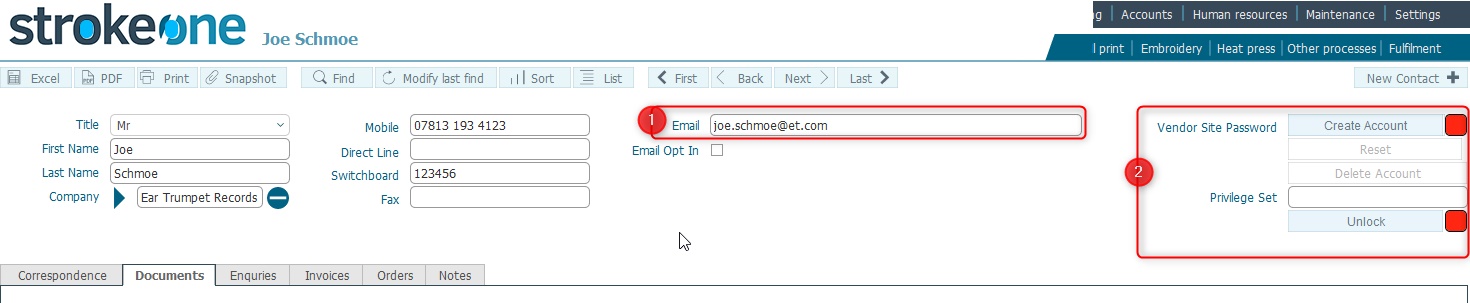
- Ensure that the email address (1) for the client is populated
- In the Vendor Site section
(2), click the Create Account button.
- The Vendor Site Account
dialog opens
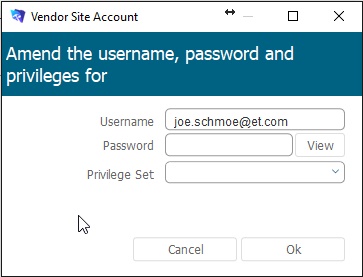
- Populate the dialog as follows:-
Username
:this will have been set with the contact's email address (1),
and cannot be changed.
Password: enter a temporary
password for the contact.
Note: the client will need to reset this to one of their choosing
when they first logon to the website
You can use the view button to see what you have set.
In
the Privilege Set drop-down,
select one of the following values:-
Vendorsite_View: Allows
the client read only access
to Totally Orginal Tracker
site. They cannot place orders
Vendorsite_Edit: Allows
the client access to Totally Orginal Tracker
site, including placing orders.
Important: There is currently no system
function to amend a user's privilege set, so exercise care
when setting this.
Click OK
to set the account
Provide the user with the credentials
that they will need to logon to the site
Username: this is the contact's
email address
Password: The temporary password
that you created in step 5b)
Note: the user will need to
change this temporary password when they first log on.
Considerations
There have been instances where the temporary
password provided to a client has set is not recognised by the Totally Orginal Tracker website
when the client attempts to first log on. If this occurs, resetting the
password seems to remedy the situation.
Related
Topics
How to Create a New Contact
Resetting
Client Password for Vendor Site