Resetting Client Password for Vendor Site
About this Task
This topic will instruct you how to reset
the password a client
uses to access the Totally Orginal Tracker website
It assumes that the client has already been granted
access
Procedure
- Open the
detail form for the contact.

- In the Vendor Site section
(1), click the Reset button.
- The Password reset
dialog opens
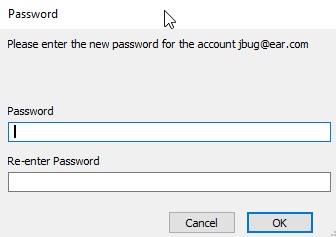
In the Password
field, enter a new temporary password
In the
Re-enter Password field, confirm the new temporary password
by re-entering it,
Click OK
to confirm the new temporary password.
Note: the user will need to
change this new temporary password when they next log on to the Totally Orginal Tracker website.
Related
Topics
How
to View Contact Detail
Granting Contacts
Access to Vendor Site