Updating the Invoice Checked Status on a Purchase Order
Background
When you place an order for goods for yourself
via a purchase order, the
supplier of the goods will invoice you in respect of the ordered items.
In strokeone
you can record that you have received
and checked the supplier's invoice
against the corresponding purchase order. You may wish to use this facility
as a workflow control to govern when you settle supplier invoices.
About this task
This topic will instruct you how to navigate to, and update that an
invoice has been checked on a purchase order.
Prerequisites
Ensure that you have located
and opened the purchase
order that you wish to update the Invoice Checked Status.
Procedure
- The Invoice Checked flag is located in the Invoice
Header fields and its default status is Red (see note below).
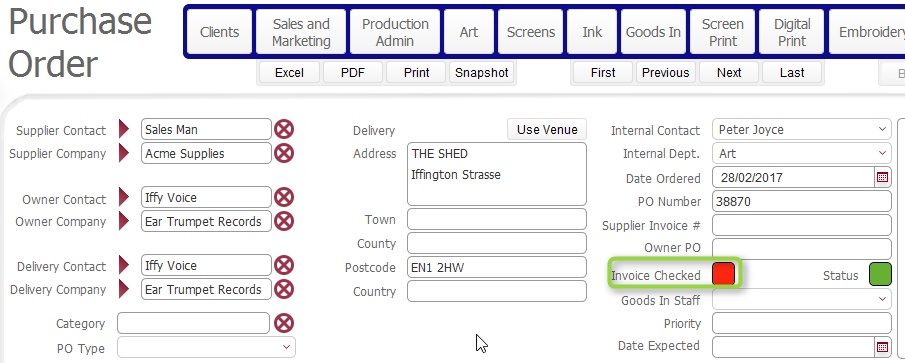
- Clicking the light will cycle the status value through Amber
then Green then Red.
- Depending on your organisation's operating practices, you may wish
to use the following status meaning for this field:-
- Red:
Invoice Not received
- Amber:
Invoice received, but requires investigation. That is, there is
a discrepancy between it and the details recorded on the Purchase
Order.
- Green:
Invoice received and reconciles exactly with Purchase Order details,
and therefore can be paid.
- You may also wish to record the supplier's invoice number in the
Supplier Invoice # field.
(This can be then be used to search for / locate the PO should there
be any future queries)
Notes
Invoice Checked status defaults to Green, when the Owner Company is
not your company. That is, should you record purchase orders on behalf
of third party companies (so that can efficiently process contract stock
from your clients) then the assumption is that the third party company
will settle the invoice with the supplier.
Related
Topics
Creating a Purchase Order
Viewing Open Purchase Orders