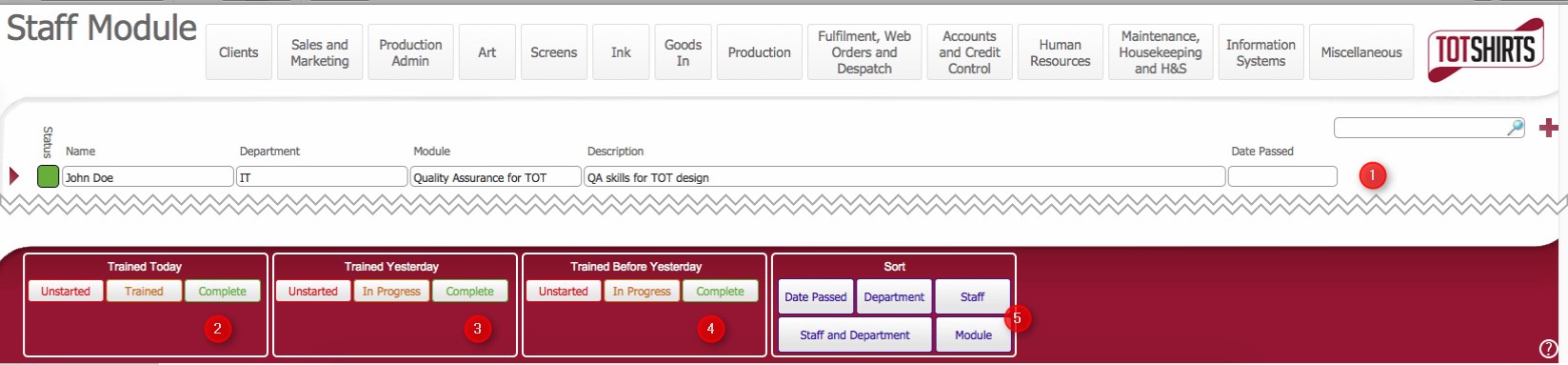
This layout lists the Staff Member's who have had Training Modules assigned to them.
The Staff Modules layout provides a quick way of viewing staff members who have been assigned training modules and what the current status of their training for that module is.
Ensure that you have logged onto strokeone, and that you can see and access the Human Resources button in strokeone home banner.
The layout is composed of the following elements :-
(1) Staff Member / Assigned Training Module data
|
Field |
Comments |
|
Status |
Indicates the status of the training module for the staff member. (Unstarted / In Progress / Complete) |
|
Name |
Forename & Surname of Staff Member |
|
Department |
The Default department for the Staff Member |
|
Module |
The Training Module assigned to the Staff Member |
|
Description |
Description of the Training Module. |
|
Date Passed |
The Date the Training Module was passed |
(2) Trained Today Scripted Sort Button
|
Button Name |
Action when Clicked |
|
|
Will filter the set of displayed records to show only those where the following is true b) Status field = |
|
Trained |
As above but:- a) Date Trained Date = Today()
TBC: ??
|
|
Complete |
As above but:- a) Date Trained Date = Today() b) Status field = complete |
(3) Trained Yesterday Scripted Sort Button
|
Button Name |
Action when Clicked |
|
|
Will filter the set of displayed records to show only those where the following is true b) Status field = |
|
Trained |
As above but:- a) Date Trained Date = Today()-1
TBC: ??
|
|
Complete |
As above but:- a) Date Trained Date = Today()-1 b) Status field = complete |
(4) Trained Before Yesterday Scripted Sort Button
|
Button Name |
Action when Clicked |
|
|
Will filter the set of displayed records to show only those where the following is true b) Status field = |
|
Trained |
As above but:- a) Date Trained Date<=Today()-2
TBC: ??
|
|
Complete |
As above but:- a) Date Trained Date<=Today()-2 b) Status field = complete |
(5) Scripted Sort buttons:-
|
Button Name |
Action when Clicked |
|
Date Passed |
Sort the record set by the Date Passed field. |
|
Department |
Groups the record set by the Department field's value |
|
Staff |
Groups the records by Staff Name |
|
Module |
Groups the records by the title of the Training Module |
|
Staff and Department |
This is grouping by Department and then Staff member by looks of things |
Related Topics
How to Assign a Training Module to a Staff Member
Understanding the Training Programme