Updating the Ink Required record as Finished
Background
Once the ink-maker has finished making / mixing the inks required for a job process, strokeone with this activity,so that its progress is tracked and the information made available to other dependent production areas.
About this task
This topic will instruct you how to navigate to, and update the ink manufacture status on a job process line.
Prerequisites
Ensure that:-
Procedure
- Locate the job process line record which has the inks you have created.
- Click the Detail button for the item identified in step 1)
- The Inks pop up form opens, detailing the actual inks required for the screens that are on the process line selected in step 2)
- In the Required Inks pane (1), locate the ink record for the ink you have made.
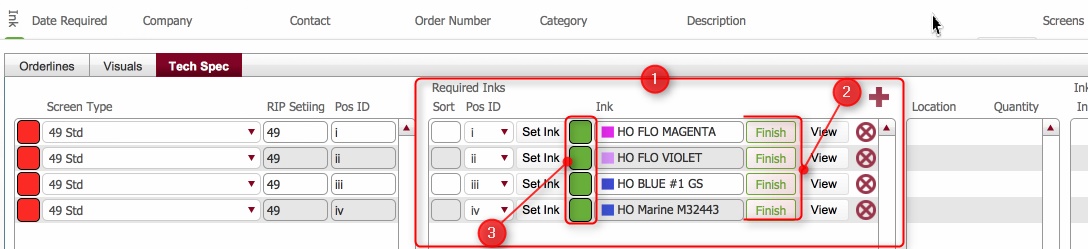
- Click the corresponding Finish button (2) for the ink you have made..
- Note that the status (3) for the ink record from step 3) updates to Completed (Green)
- Repeat steps 4) to 6) as applicable.
- When the status for all of the items in the Required Inks pane is updated to Completed, then the aggregate Ink status icon on the Inks Layout updates to completed.

Related Topics
Inks Layout