Post wash: reclaiming a screen-set
Placeholder for
now until the mechanism/layout by which you identify and administer the
screen-sets that will be reclaimed POST WASH
Expectation is that this will be an ipad layout
Background
When a screen-set is washed after the print job has completed, it may
be decided that there is no likelihood of the job order being repeated.
If the job order will not be repeated, it is inefficient to file the screen-set
in the warehouse shelves. A better option would be to reclaim
the screen, by removing the exposed image from the mesh and returning
it back into a blank state, where it can be washed, de-greased and then
coated with emulsion ready to be used again.
About this task
This topic will instruct you how to update strokeone
to reflect that the screen-set has been reclaimed
post washing.
Note:
- This topic does not instruct you in how to physically
reclaim the screen-set as that is a manual process external
to strokeone.
Prerequisites
Ensure that you have completed the following tasks in strokeone before proceeding
:-
- Opened the Stencils
Required Layout
Procedure
- Within the Stencils Required
layout, locate the screen-set
record for the screen set you are going to reclaim
Tip: You can use the screenset number on the screens'
printed labels to cross reference to the screen-set
number in the Stencils Required
Layout.
- Open
the screen-set record identified in step 1)
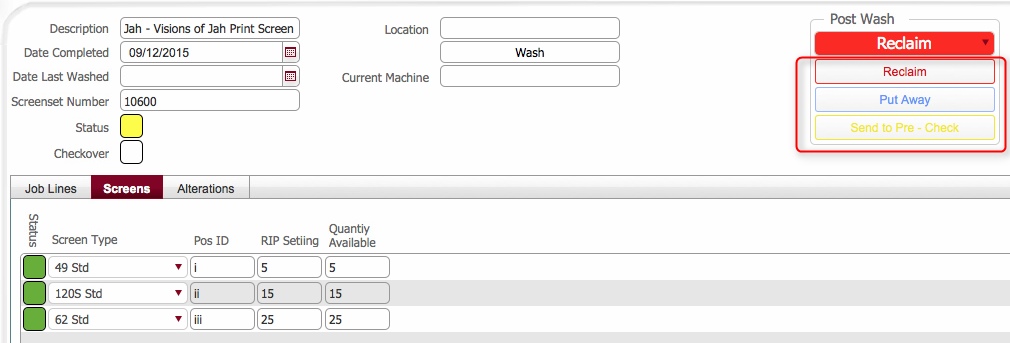
- Locate the Post Wash action
buttons in the upper portion of the layout.
(circled in the below screen-shot)
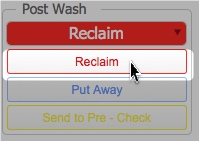
- From within the Post Wash
section, click on the Reclaim
button.
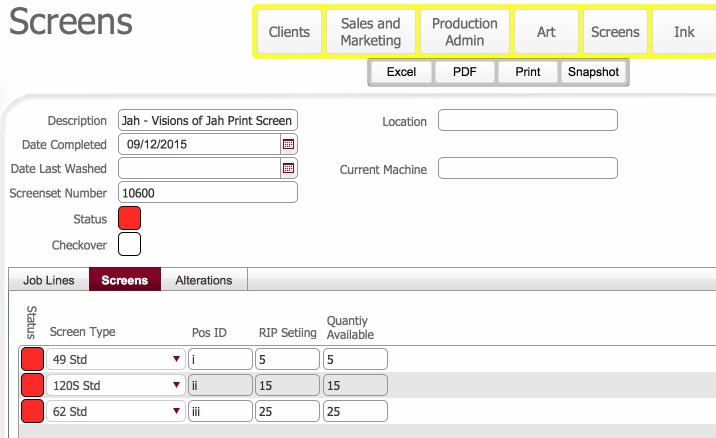
- This causes strokeone
to undertake the following processes :-
- The number of individual screens
on the screen-set record is counted
- The individual screens on the screen-set are grouped
by SKU / Screen Type, and a count
is kept of the quantity in each grouped
SKU / Screen Type.
- The status
for each individual screen
in the screen-set is reset to Not
started (red)
- The status
for the screen-set is
reset to Not started (red)
- The Location field
on the screen-set record is blanked
out.
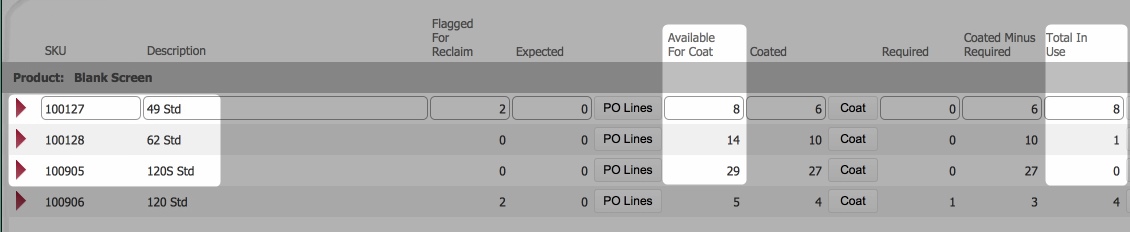
- In the screens
control list, the following accounting entries are made
- The in use
totals are also debited
by the corresponding SKU/
Screen Type group count from step 4b)
- The available to coat
totals are credited by the corresponding SKU/
Screen Type group count from step 4b)
click
for example
Related Topics
Post
Wash: Decisions for a Screen-sets future usage
Stencils
Required Layout