The Screens Control List layout provides users with a powerful dashboard from which to view management information pertaining to the current inventory and life-cycle of the screens that are in operation, including for each screen type:-
By exposing this real time, event driven, operational data in a dashboard, screen-room staff are able to make informed decisions as to how to manage the existing inventory versus scheduled requirements, and to prioritise workloads accordingly.
This topic will instruct you how to understand the contents of, and the actions allowable from, the Screens Control list layout.
Ensure that:-
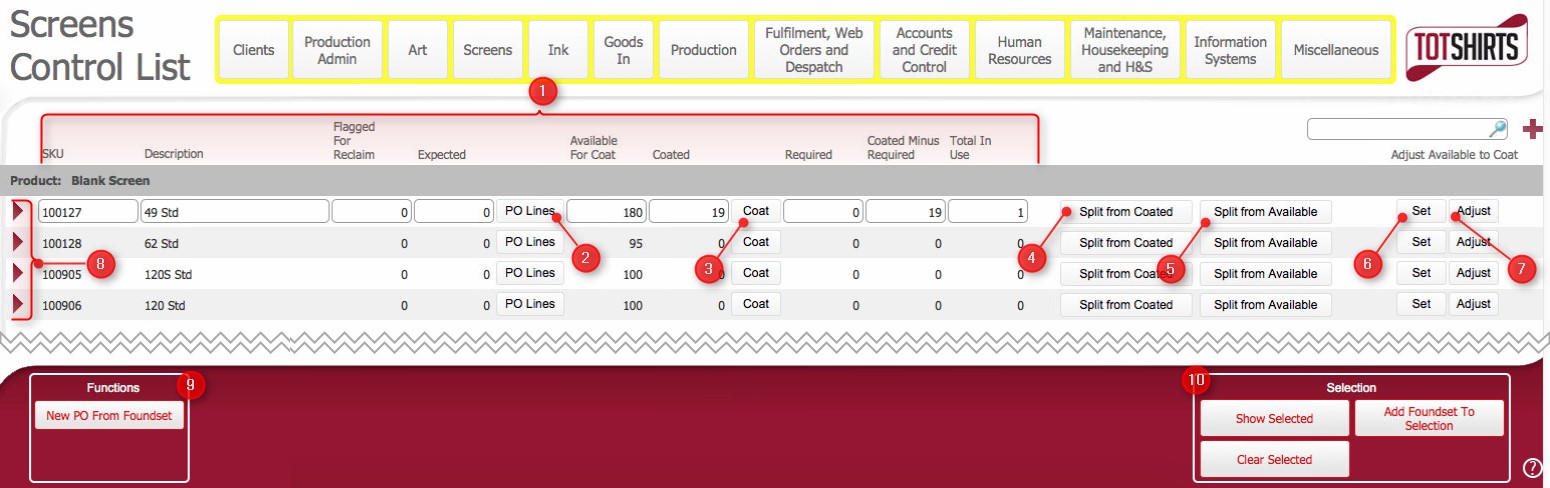
This layout is composed of the following elements:-
(1) Screen inventory control numbers
This layout shows a series of control numbers for each unique screen SKU. The numbers are real time based on the status of screen manufacture, preparation and usage, as well as the associated production processes.
For each unique screen SKU (Note: at TOT Shirts Limited, a screen is uniquely defined at a SKU level by it's mesh count and frame-size), the following information is shown..
Field |
Comments |
SKU |
The internal stock line item reference number for a screen |
Description |
The description associated with the SKU Typically in the form of <mesh_count> <frame-size> |
Flagged for Reclaim |
An @sum quantity of the screen SKU that has been flagged
for reclaim. |
Expected |
An @sum quantity of the screen SKU that has been ordered
on one or more purchase
orders but not yet been delivered.
When the expected screens are received, the expected pool is debited, and the available to coat pool is credited by the quantity of the blank screen SKU booked in as received on the purchase order.. |
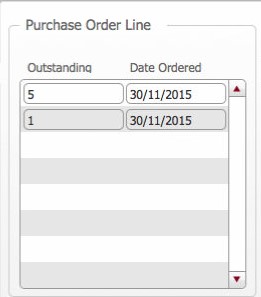
Clicking on PO Lines button provides you a breakdown of the expected figures, showing the outstanding amounts on purchase orders, and the date the purchase order was raised. Click here to see an example. |
|
Available to coat |
The quantity of this screen sku that is ready to be prepared for usage. That is, the quantity physically available to be coated with photo sensitive emulsion once prepared.
Note this quantity is
adjusted according to the following transactions:- |
Coated |
The quantity of the screen's SKU that are physically coated with emulsion ready for imaging.
Note this quantity is adjusted according to the following transactions:
|
Required |
This figure is a calculated @sum of the number of screens of this size that are required on all jobs orders that are not yet started.
Specifically it is an @sum of this screen SKU where
|
Coated minus required |
Indicates the number of coated screens in excess or in shortfall of current requirements. Calculated figure of [Coated - Required] |
Total in Usage |
Total number of the screens that have been created are associated to a job order
. |
(2) Purchase Order Lines button: will
show the purchase orders
that ordered screens are expected on.
(3) Coat button: Allows members of the screen room to record how many screens they have coated.
(4) Split from coated button: Allows members of the screen room to record how many coated screen have split.
(5) Split from available button: Allows members of the screen room to record how many available for coating screens have split.
(6) Set: allows you to set how many coated screen exist.
(7) Adjust button: allows you to adjust the quantities of coated screens.
(8) - TBC - doesn't currently have any functionality
(9) Allows you to raise a Purchase Order from the screen types shown
(10) Scripted finds and sorts
Related Topics
How to update a screen as coated
Populating and Sending a Purchase Order
Booking In Items received on Purchase Order
Viewing Opening Purchase Orders