At
the Fulfilment
level, the Available
to Pick status light can have
one of three statuses
Red:
The Available to pick status
light for a Fulfilment has three statuses which are designed to help you
know when you can pick the stock required for the Fulfilment.
This field is an aggregate status,
meaning that it is made up from the Available
to Pick statuses of all the
underlying line items that are contained on the Fulfilment.
Let’s look at the three possible statuses that the Available to Pick status
at Fulfilment Level can have,
and how these are made up relative to its underlying line items.
At
the Fulfilment
level, the Available
to Pick status light can have
one of three statuses
Red:
Now that we know how the Fulfilment level status is set, let’s look at how the underlying line level status is derived.
It is important to understand how the Available
to Pick Status light at the line
level is set.
It is based on a comparison of the physical
available balance of the SKU
relative to the Quantity of the SKU required on the fulfilment (the To Be Given amount)
If the physical available balance for a SKU is equal to or in excess of the To Be Given figure then its Available to Pick light is set as Green.
If the physical available balance of a SKU is greater than zero, but less than the To Be Given figure, then the Available to Pick light is set as Amber.
If the physical available balance of a SKU is zero, then the
Available to Pick light
is set as Red
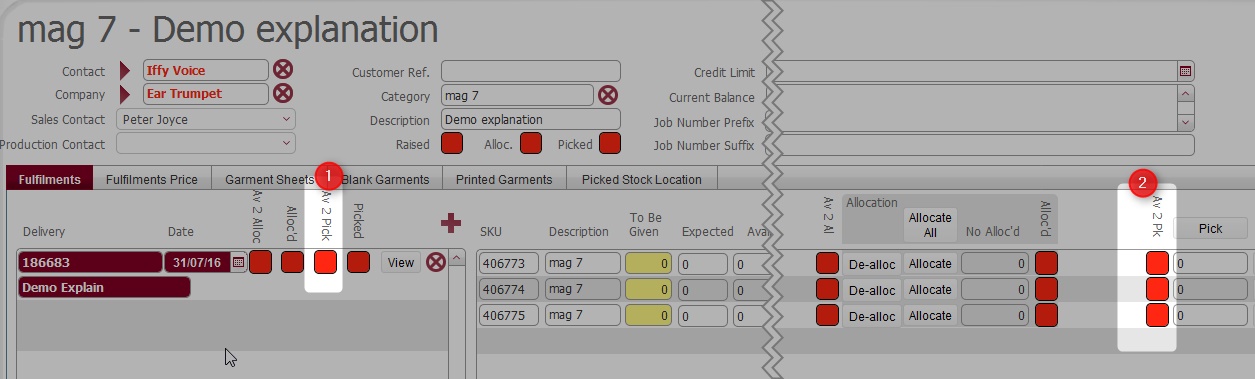
Let’s include the To Be Given, and Physically available figures on an example Fulfilment to illustrate this:-

We can see in the above screen-shot, that the Quantity Ordered (1) is 20 for each of the SKU’s.
However in terms of physical availability (2)
As there are one or more amber statuses at the line level, the aggregate Available to Pick Status (4) light for the Fulfilment is set to Amber.
It is important to understand the following:-
The Physical Available balance represents the stock balance within stock locations in the warehouse
Quantities held physically in stock locations are not reserved as such for a Fulfilment, until they are actually picked.
Once picked, the physical available balance will debit by the amount that is picked.
This means that the physical balance and therefore the available to pick status for a SKU dynamically changes as it is picked by other fulfilments.
The next section exemplifies this.
Following on from above, consider the following situation:-
As the Physical available balance for SKU 406776 is 10 at this point, each fulfilment compares its To Be Given figure of 10 versus the Physically available balance of 10, and therefore the Available to Pick status for each is set as Green.
Looking at the system we see that both Fulfilments show that they are Available to Pick.
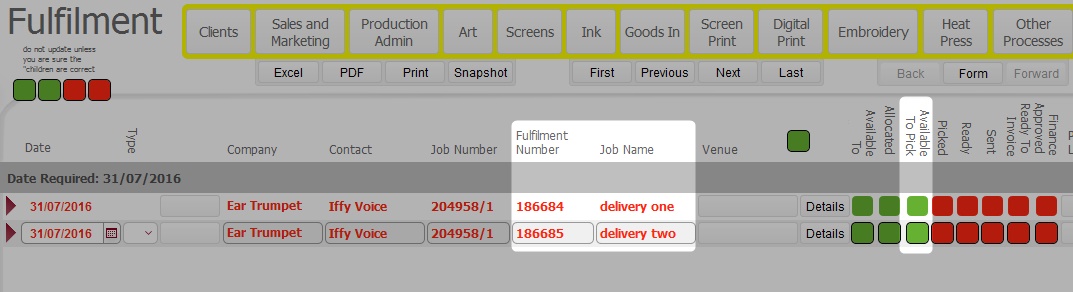
Now, consider that someone picks the 10 available stock of the SKU for the Fulfilment delivery one.
The following updates occur on this fulfilment:-
The Picked status for Fulfilment Delivery one now updates to Green as the item has been fully picked
The 10 picked debits down the Physically available balance for SKU 406776, resulting in a Physical available balance of zero.

Crucially, as Fulfilment Delivery One has picked 10, the physical available balance which can be used by any other fulfilment is now zero
This is evidenced on Fulfilment Delivery Two. For this fulfilment, its To Be Given figure of 10 is now compared to a zero physical available balance, and thus it is set as Red as it cannot physically be picked.

Looking at the Fulfilment List Layout, we can see the status of both Fulfilments together, and see how picking the physically available balance of the SKU for Delivery One affected the Available to Pick status for Delivery Two
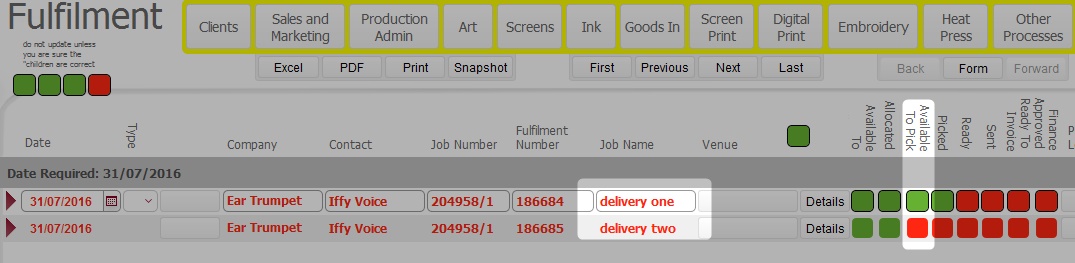
The situation can be summarised as follows:-
It is important to understand that the Available to Pick status on a single fulfilment is based upon the physical stock balance for SKU's contained on it, and this physical balance can be reduced by being picked on other fulfilments.
You therefore can have a situation where the Available to Pick status light for a fulfilment updates from Green to Amber or Red as the physical availability of a SKU is reduced as a result of being picked on other fulfilments.
Related Topics
Picking items for a Fulfilment