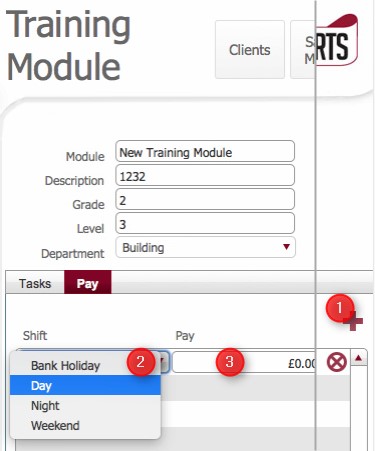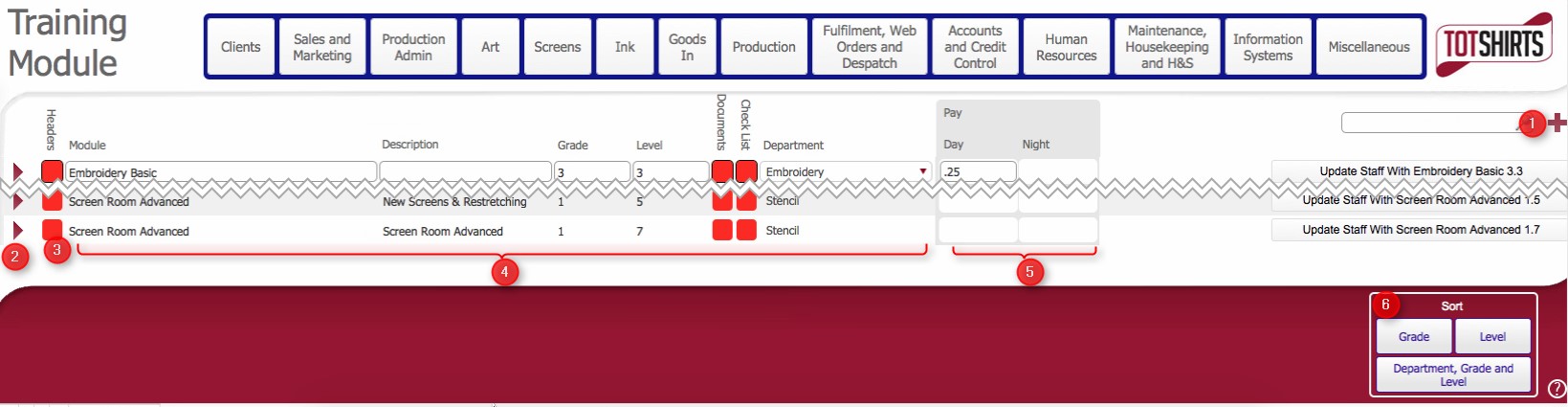
This topic outlines the steps necessary to accurately create a Training Module record in strokeone.
A training module is a set of instructions that relate to a particular function or working practice.
It is composed of one or more Training Tasks that have been associated to the training module.
See Understanding the Training Programme for more information.
Ensure that are in the training modules list view

|
Field |
Instructions | ||||||||||||||||||||
|
Headers |
TBC: A toggle field to ??? ** what does this do ** |
||||||||||||||||||||
|
Module |
Change the "New Training Module" text to be the full title of the module |
||||||||||||||||||||
|
Description |
Enter additional description for the Module |
||||||||||||||||||||
|
Grade |
Grade and Level are used as numerical values that not only serve to classify the Training Module,. but they are used as the linkage mechanism when assigning training tasks to a training module. Therefore at least one number should be added, and it should be unique within the Training Modules for a Department. A suggested mechanism would be to use the following number syntax:-
The next time a training module is created for Art, the Level value is incremented
|
||||||||||||||||||||
|
Level |
|||||||||||||||||||||
|
Department |
Select from the drop-down list, the Department that the training module applies to Bear in mind that a Training Module can only be applicable to a single Department. |
||||||||||||||||||||
|
Pay Day |
The hourly wage increment amount in base currency above their base pay that can be awarded to a day shift staff member who has completed this training module How to populate this See Understanding Relationship Between Training Modules and Pay for more details |
||||||||||||||||||||
|
Pay Night |
The hourly wage increment amount in base currency above their base pay that can be awarded to a night shift staff member who has completed this training module
|
Training Modules needs to have training tasks assigned to them before they can be regarded as useful.
To perform this tasks, see How to Assign a Training Task to a Module
Once a Training tasks have been assigned, the Training Module can be in turn assigned to a staff member.
Related Topics
How to Assign a Training Task to a Module
How to Assign a Training Module to a Staff Member