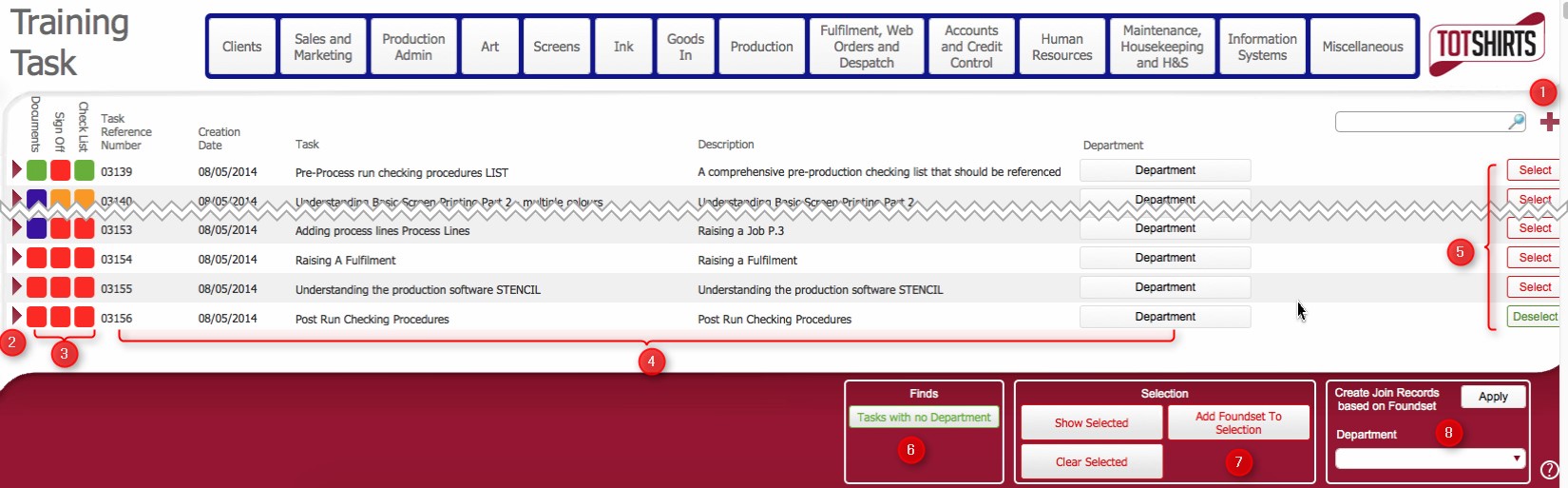
This topic outlines the steps necessary to accurately create a Training Task record in strokeone.
A training task is a set of instructions that relate to a particular function or working practice. See Understanding the Training Programme for more information.
In turn, a set of training tasks gets grouped together and associated to a Training Module.
Ensure that are in the training tasks list view

|
Field |
Instructions |
|
Documents |
A toggle field to indicate whether the training task record has documented procedures / instructions |
|
Sign Off |
A toggle field to indicate whether the content of the training task record has been signed off |
|
Check List |
A toggle field to indicate whether the training task record has a checklist. |
|
Task Reference Number |
Automatically inserted. A system generated reference number for the training task record. |
|
Creation Date |
Automatically inserted. The time stamp of when the training task |
|
Task |
Update from New Task to the Title of the Task |
|
Description |
A brief description of what the task refers to |
Related Topics
How to View Training Tasks List
How to View Training Task Detail
How to Associate Training Material to a Training Task Record
Understanding the Training Programme