Creating Departments
Overview
Departments are used throughout strokeone, e.g. for recording process line data, as well as in the HR module.
Whether a department appears as a selectable process line department or not depends on how it is defined.
About this Topic
This topic outlines the steps necessary to create departments that can be used within strokeone.
Prerequisites
Ensure that you have logged onto strokeone, and that you can see and access the Settings button in strokeone's home banner.
Procedure
- From the home banner, click the Settings and then System Preferences buttons.
- In the Preferences layout, ensure you click the HR tab(1), and from within that, the Department (2) tab.
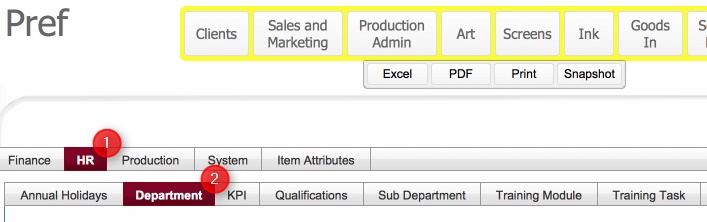
- The Department tab shows all existing departments defined in strokeone, together with a boolean attribute to denote whether they are a Production Department - departments marked defined with 1, i.e. Production departments will be displayed as selectable items in the process line drop-downs. ,
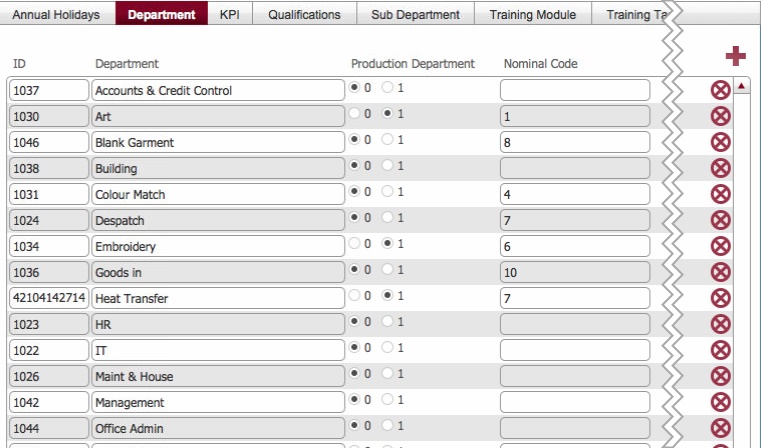
- To create a new department, click on the new record icon in the upper right of the main pane in the layout.
- This causes a new department record to be inserted into the table.
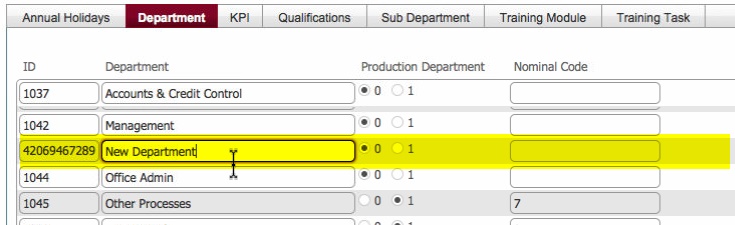
- Populate the new record as follows:-
|
Field
|
Comments
|
Field Type
|
|
ID
|
Unique, internally generated sequence number for the record.
|
Sequence Number
|
| Department |
Change this from New Department to the name for the new department |
Alpha-numeric |
| Production Department |
Defaults to 0 meaning non-production department.
If you wish this department to be a selectable value for a process line on a job order, set this value to be 1 |
Boolean |
| Nominal Code |
This field allows you to record a value that can be used to cross-reference the department for accounting purposes.
This field is exposed on invoices for each billable row of data so that it can be imported into your accounting package to enable cost / spend analysis per department. |
Alpha-numeric |
- Once added,. the department is available to be selected in various layouts throughout strokeone.
Related Topics
Settings Module