Creating Sub Departments
Overview
Sub Departments are used throughout strokeone,
e.g. for further classifying an employees functional area in their Staff
Detail record
As the name implies, Sub-department records are linked to Department
records, which therefore need to exist prior to creating the sub-department
record.
Additionally, sub-departments are often contextually selected. That
is, their parent department is first selected, which then looks up the
applicable sub department records.
About this Topic
This topic outlines the steps necessary to create
sub-departments that can be used within strokeone.
Prerequisites
Ensure that you have logged
onto strokeone,
and that you can see and access the Settings
button in strokeone's
home
banner.
Procedure
- From the home
banner, click the Settings
and then System Preferences
buttons.
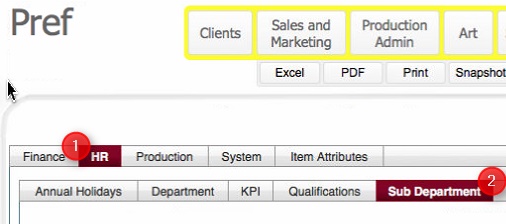
- In the Preferences layout,
ensure you click the HR tab(1), and from within that, the Sub Department
(2) tab.
- The Sub Department
tab shows all existing sub
departments defined in strokeone,
together with the parent
Department to which they are linked..
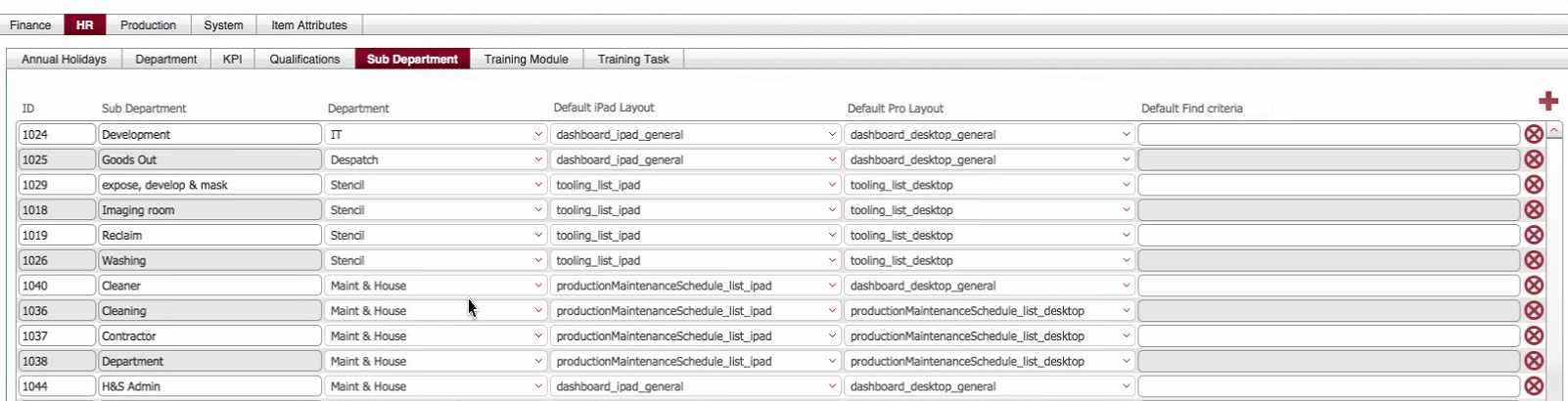
- To create a new sub department, click on the new
record icon in the upper right of the main pane in the layout.
- This causes a new sub department
record to be inserted into the table.

- Populate the new record as follows:-
Field |
Comments |
Field Type |
ID |
Unique, internally generated sequence number for the
record. |
Sequence Number |
| Sub Department |
Change this from New
Sub Department to the name
for the new department |
Alpha-numeric |
| Department |
Select a Parent department
to which this Sub Department is associated. |
Alpha-numeric |
| Default ipad Layout |
Dev:
To define - what does this do ? |
|
| Default Pro Layout |
Dev:
To define - what does this do ? |
|
- Once added,. the sub-department is available to be selected in
staff
detail layout, and various layouts throughout strokeone.
Related Topics
Settings Module
Creating Departments