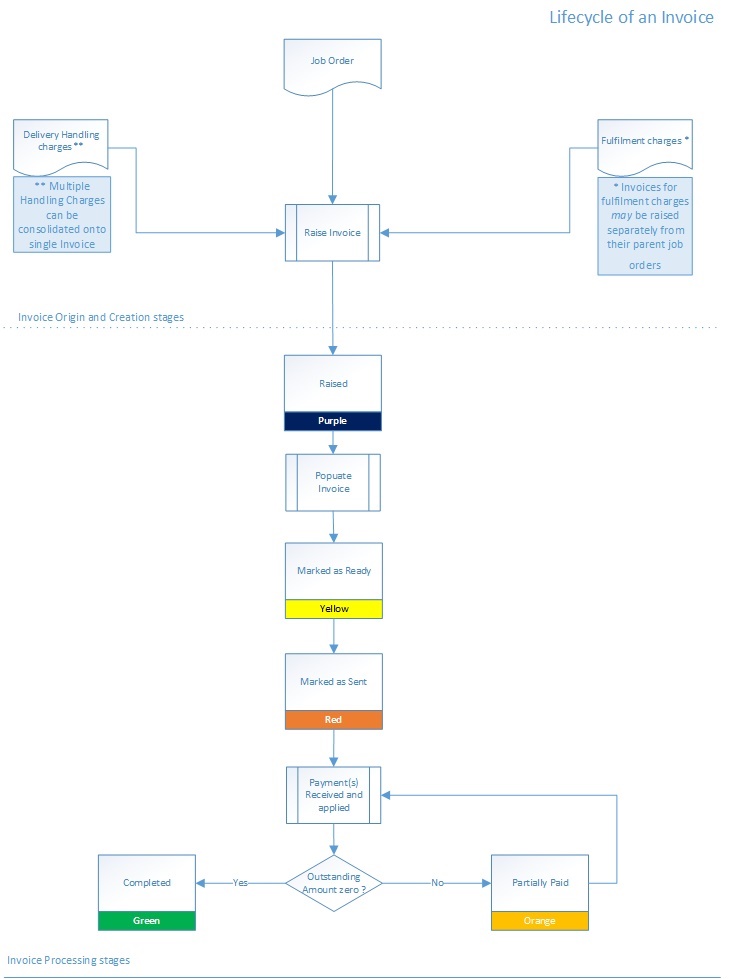
Status Colour
Meaning

Invoice has been raised.

Invoice has been populated and marked as ready.
(All billable charges that are to be included on the invoice have
been added, and it is ready to
be sent to the client)

Invoice has been marked as sent.
(The invoice has been sent to the client, and is now
locked down - i.e. none of the billable charges can be
added to, or amended on the invoice)

Invoice has been partially paid
(One or more payments have been received in respect of the invoice, but do not fully satisfy the invoice total. That is, the balance outstanding on the invoice is greater than zero)

Invoice has been fully paid
(The payment(s) received against the invoice satisfy the invoice total. That is, the balance outstanding is zero)