Allocating Received Payments
Background
When payments
have been received from companies in respect of their invoices, the
next step of the invoice settlement process is to apply,
or allocate,
the payment toward open invoices.
Depending on the amount
of the payment, the number of
open invoices, and/or instructions
from the client, you may allocate the payment to one or more open invoices.
By way of a reminder, an open invoice,
is one where there is still an outstanding (i.e. not paid) amount. A client's
Current Debt is the sum of amounts outstanding on all the client's invoices.
Allocating payments can thus conceptually
be seen as the process by which funds received, but not yet used, from
the client, "Unallocated Payments" are used to pay down "settle"
the client's Current Debt.
Prerequisites
Ensure that you have logged
onto strokeone, and
have opened the detailed layout
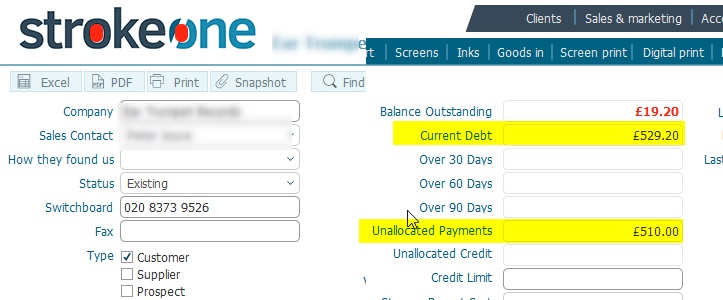
of the company with Unallocated Payments you wish to allocate.
Note: In
order to allocate received payments, the following balances must be positive:-
- Unallocated Amounts
- Current Debt
Procedure
- Ensure that you have selected the
Invoices tab
- Within the Payments pane,
identify a payment record which has a positive
Remaining Balance .
- Press the Select button
for the record identified in step 2)
(Note: if you have multiple
payments with a remaining balance, you can only allocate one at a
time)

- Next, in the Open Invoices
pane, identify an invoice with an outstanding balance, that you wish
to allocate the selected payment toward.
- There are two methods of applying the payment to the Outstanding
Amount. You can either specify the amount to allocate, or you can
automatically allocate the lower of the payment remaining amount,
or the outstanding amount of the Invoice.
If you wish to specify the amount, proceed to step 6); to automatically
allocate, proceed to step 8)
- To specify the amount
- Click the Apply button
for the invoice identified in step 4)

- The Payment Amount
dialogue appears.
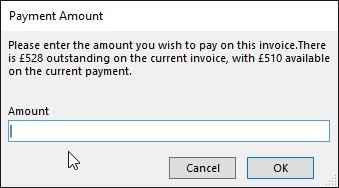
Note: how the dialogue
verbiage refers to the outstanding amount of the invoice selected
in 6a) (GBP 528in this example) and the Remaining Amount of the
Payment selected in step 3) that can be allocated towards it (GBP510)
in this example
- Enter the amount of
money from the Remaining Amount
that you wish to allocate.
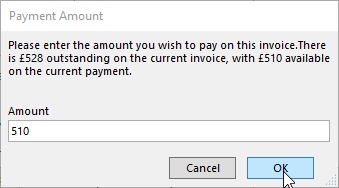
and click OK.
- The following updates occur:-
- The Outstanding Amount
of the invoice is
credited by the amount
specified in step 6c)
- The
paid status of the invoice is updated:-
If Outstanding amount = zero, set as Green
(completed), if >0, set as Amber
(In Progress)
- The Used Amount
on the Payment is
also credited by the
amount specified in step 6c
- The allocated
status on the payment
is updated:-
If Remaining amount = zero, set as Green
(completed), if >0, set as Amber
(In Progress)
- The Remaining Amount
on the Payment is
recalculated as Paid
minus Used
- The company's
Current Debt
is recalculated as @sum
of Outstanding
Amounts.
- The company's
Unallocated
Amount is recalculated as @sum
of Remaining
Amounts
- The company's Balance
Outstanding is recalculated as Current
Debt minus
Unallocated.
Click
for an example
- If you still have a remaining
balance on the selected payment and wish to specify an
amount of this to allocate towards any outstanding invoice amounts,
repeat steps 4) to 6)
- To automatically
allocate the maximum amount of a received payment against an
invoice Outstanding Amount:-
- Click the Apply All
button for the invoice identified in step 4)

- strokeone determines
the maximum amount of the remaining payment that is needed to
pay-down the outstanding invoice amount.
- Set "payment
allocation amount"
by calculating the min
of (Outstanding, Remaining
Amount)
- The Outstanding Amount
of the invoice is
credited by payment
allocation amount
- The
paid status of the invoice is updated:-
If Outstanding amount = zero, set as Green
(completed), if >0, set as Amber
(In Progress)
- The Used Amount
on the Payment is
also credited by payment
allocation amount
- The allocated
status on the payment
is updated:-
If Remaining amount = zero, set as Green
(completed), if >0, set as Amber
(In Progress)
- The Remaining Amount
on the Payment is
recalculated as Paid
minus Used
- The company's
Current Debt
is recalculated as @sum
of Outstanding
Amounts.
- The company's
Unallocated
Amount is recalculated as @sum
of Remaining
Amounts
- The company's Balance
Outstanding is recalculated as Current
Debt minus
Unallocated.
Continue to allocate Payments until
either the Unallocated Payment amount is zero, or Current Debt Amount
is zero.
Related
Topics
Company Detail Invoice Tab
Recording Payments
Received from Companies