Recording Payments Received from Companies
Background
When invoices
are raised
and sent to clients, they need to be settled.
Typically
settlement is achieved by the owing client making a payment of funds in
respect of the invoice.
Clients may elect to make payments in a
one to one manner per invoice, or they may make a single payment that
can be applied to several open invoices.
strokeone provides the flexibility
to process this, as the receipt
of payments is separated from its allocation..
Prerequisites
Ensure that you have logged
onto strokeone, and
that you can see and have opened the detailed
layout of the company whom the payment has been received from.
Procedure
- Ensure that you have selected the
Invoices tab.
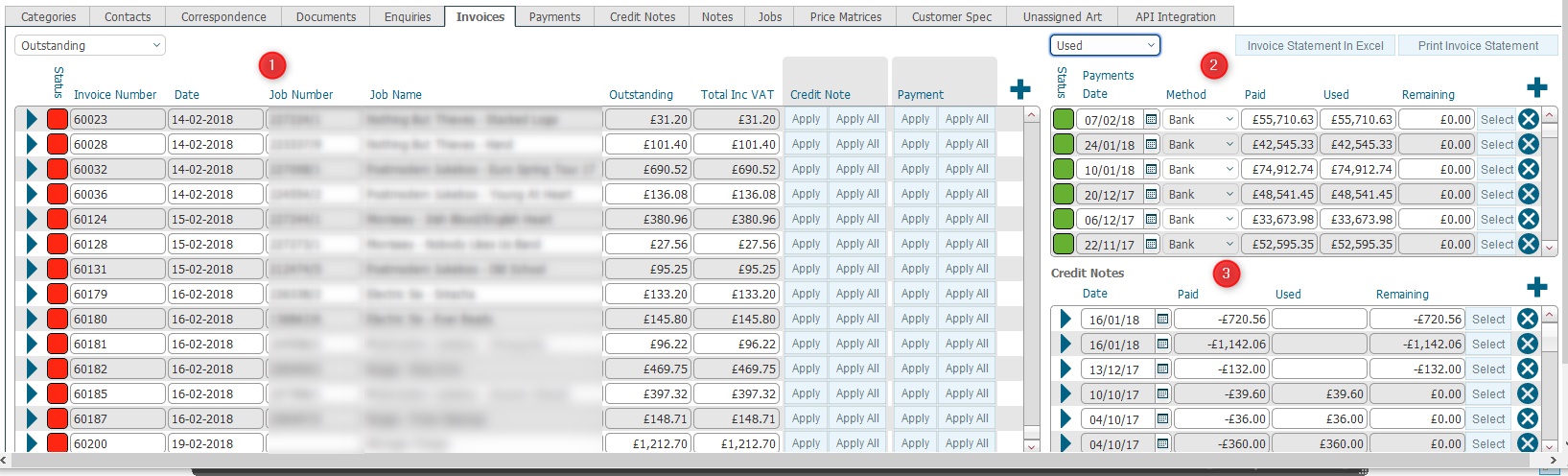
(Note: In the below sections/text,
the numbers in (bold parenthesis)
refer to the annotations in the above screen-shot)
- Click on the new
record icon in the Payments received
(2) pane.
- A new blank payment record
is inserted,

Dev:
Open enhancement to insert the new row at the top of the pane. Currently
it is inserted at the bottom which means user [potentially] needs
to scroll down to find it for populating.
- Click the Select button
to highlight the record inserted in step 3)
- Populate the payment record
data fields as follows:-
Field |
Instructions |
Payments Date |
Click the activate the calendar, and select the date that
the payment was received. |
Method |
Select from the drop-down list the value that represents
how the client made the payment.
Current values are:-
Adjustment Bank Transfer Cash Cheque Credit Card
Tip:
you can create
additional values in this drop-down list if required. |
Paid |
Enter here the amount of the payment.
Note: This is a money field,
so you can enter the payment amount with up to two decimal points
of precision. |
Used |
This field shows the amount of monetary value of the payment
that has been used in settlement of open invoices. It gets populated
when the payment is allocated. |
Remaining |
This is automatically calculated field (Paid)
minus (Used).
The remaining amount is deemed Unallocated, and contributes towards
the Unallocated Payments
balance.. |
- When you have entered the payment details, it should look something
similar to this:-
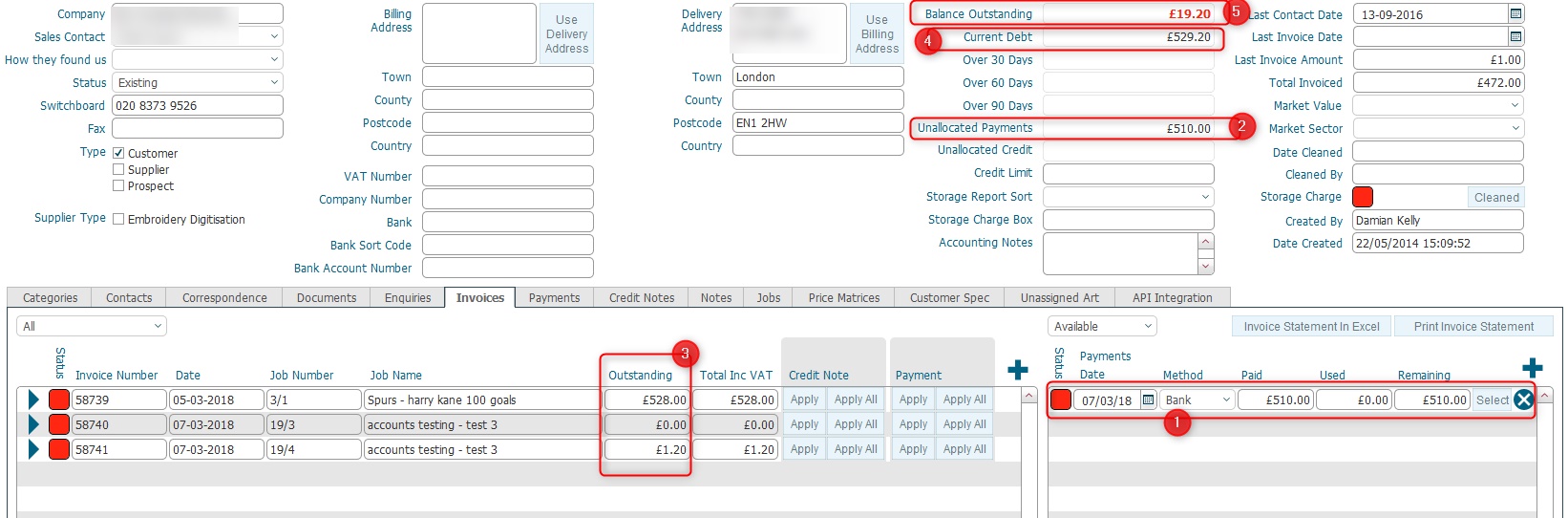
Note the following:-
- The payment received record
(1) is detailed in the payments pane.
- The payment received record is set with a Status
of Red, as none of the Paid
amount has been used.(i.e. Used
= Null)
- Unallocated Payments (2)
field for the company is automatically recalculated. (Unallocated
Payments is calculated as @sum
of Remaining Amounts on
all payment received
records for this company)
- Similarly, the Balance Outstanding
(3) field is auto-recalculated. This is calculated as Current Debt (4) minus
Unallocated Payments (2)
- Current Debt (4) is
made up of an @sum
of Outstanding Amounts
(3) on open invoices for the company.
- Repeat steps 2) to 6) if you are recording multiple payments
received from the company.
Note: In order that you maintain reconciliation between your banking
ledger and Strokeone Software Limited,
it is strongly recommended that you record payments in the system
exactly as they were received. Consolidating multiple payments received
by your bank into a single system payment entry is not good operational
practice.
Related
Topics
Allocating Received Payments
Company Detail Invoice Tab