Purchase Order Statuses
Abstract
A Purchase Order has a life
cycle, from creation, to sending, to the receipt
of goods (fully or partially) and completion.
The status icon follows the
standard methodology in the system but has some specific additional states
to help visually identify at what point in its life cycle
Status
Colour |
Meaning |

|
The purchase order has been created, but not yet finalised
or sent |

|
The order has been sent.
The order details cannot now be modified. |

|
A delivery for the order has been received |

|
Part of the order has been received and booked
in. There is an outstanding balance for the remainder of the
order |

|
All goods on the order have been received and booked
in. The order is complete. |
Flashing Blue |
A user has manually set the Purchase Order as having an
issue |
Purchase Order Life Cycle
The below schematic shows the various life cycle stages of a purchase
order together with their corresponding states in strokeone.
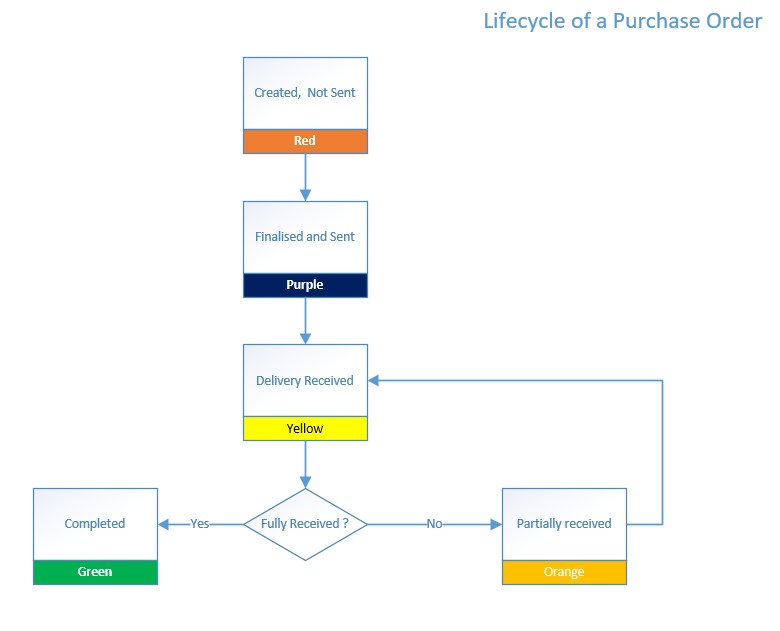
It is worth noting that between a purchase order being sent, and all
of the items on the order being booked in, it is possible to cancel
items from the purchase order.
(Assuming the supplier is able to cancel the items)
Related
Topics
Viewing Open Purchase Orders
Viewing
a Purchase Order's Details