To Do, but
To Do
Ensure that you have logged onto strokeone, and that you can see and access the Human Resources button in strokeone home banner.
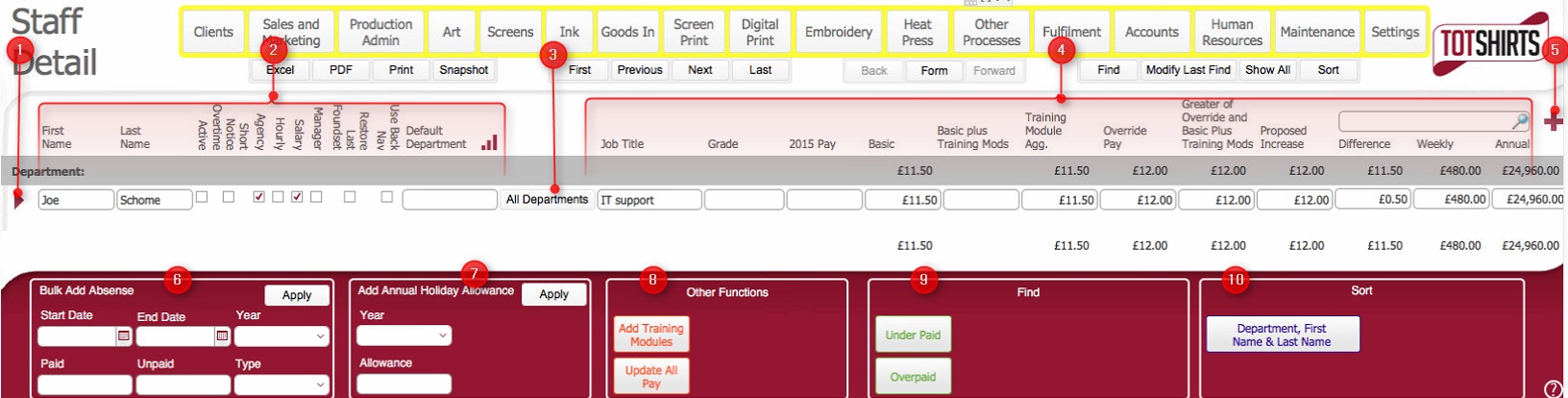
(Note: In the below sections/text, the numbers in (bold parenthesis) refer to the annotations in the above screen-shot)
The layout is composed of the following elements
(1) Click on the open record icon to drill down to the Staff Detail layout
(2) General Data Fields
relating to Staff Member, specifically, for each Staff member record
listed, the following information is shown:-
Field |
Instructions |
| First Name | First name of the staff member |
| Last Name | Last name of the staff member |
| Active | Checkbox to indicate whether the staff member is active or not. |
| Short Notice Overtime | Checkbox to indicate whether the staff member is prepared / available to work overtime shifts at short notice. |
| Agency | Checkbox to indicate whether the staff member is employed directly or through a 3rd party agency |
Hourly |
Denotes the staff member is paid an hourly rate. |
Salary |
Denotes the staff member is paid set salary. |
Manager |
Checkbox to indicate whether the staff member is a Manager. |
Restore Last Foundset |
Dev: To define |
Use Back Nav |
Dev: To define |
Default Department |
Indicates the employee's default department. |
.
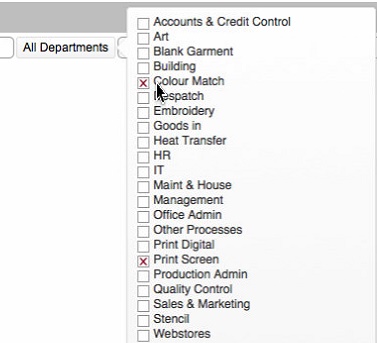
(3) Department button. Clicking this button will display a pop up window that displays which departments the user is associated to. Additionally, you can associate/disassociate a department to the user by enabling / clearing the corresponding check-boxes.
(4) Financial Data Fields relating to Staff Member, namely:-
Field |
Instructions |
| Job Title | Employee's job title classification. |
| Grade | Employee's job grade. |
| 2015 Pay | Records the hourly rate for the employee for the previous year. |
| Basic | The standard hourly rate for an employeeof at the defined grade and the defined department. |
| Basic Plus Training Mods | Automatically calculated field, (Basic Pay plus Training Module Agg) |
| Training Module Agg | If the employee has passed any training modules, the monetary value of these will be shown here. |
| Override Pay | If the employee is paid greater than Basic Pay plus the value of training modules this records their "override" hourly rate. See Understanding Relationship Between Training Modules and Pay for more details |
| Greater of Override and Basic Plus Training Mods | Automatically calculated field: Max(Basic plus Training Mods, Override Pay) |
| Proposed Increase | Automatically calculated field:(Greater of Override and Basic plus Training Mods minus 2015 Rate) |
| Difference | Automatically calculated field designed to determine whether a staff member is overpaid relative to the training they have completed. That is, it looks at their current Override Pay and determines whether this is in excess of Basic Plus Training Mods. If it is, it results in a positive difference amount indicating that the staff member is overpaid. |
| Weekly | Automatically calculated field: (Greater of Override and Basic plus Training Mods * 40) |
| Annual | Automatically calculated field: (Weekly *52) |
(5) New record icon. Click this to create a new staff member record.
(6) Bulk Add Absence: To do
(7) Add Annual Holiday Allowance: To do
(8) Other Functions: To do
(9) Scripted Finds: To do
(10) Scripted Sorts: To do
Related Topics
To do