How to Populate Job Footer Fields
About this Task
This topic outlines the steps necessary to accurately record the Job footer fields on a job order.
Background
Once you have populated the Job
Header fields, the next stage of writing up a customer job
order is to populate the Job Footer
fields.
The job
Footer fields are at the bottom of the job order form and are shown
in the below screen-shot within the brace:-
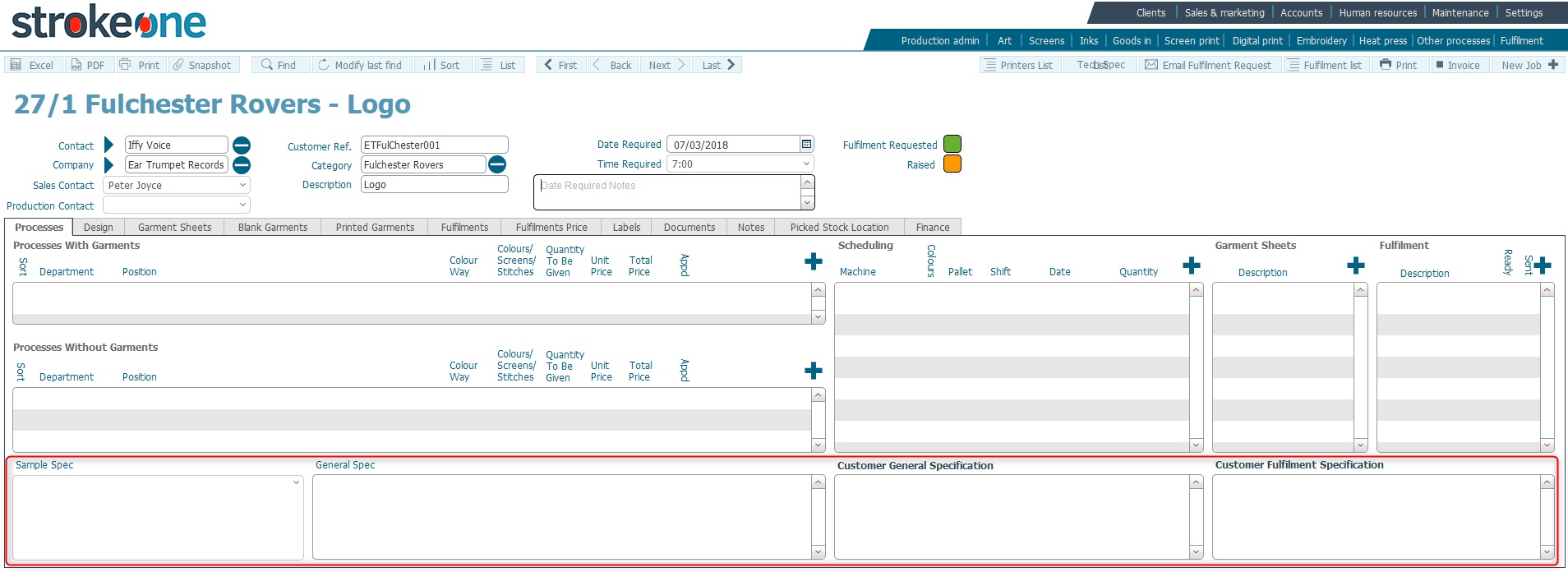
Job footer fields are optional
and record supplementary information about the Job Order, such as whether
to produce file samples, as well as providing free form text fields which
can be used to hold job and fulfilment related information not recorded
elsewhere.
Prerequisites
Ensure that you have populated
job header fields before proceeding.
Procedure
- Ensure you have selected the Process
tab on the job order to display the footer fields.
- In the File Sample Instructions
field, you can use the drop-down
pick list to select the appropriate entry to describe whether
to create a file sample.
It is suggested best practice to always create a file sample for the
first instance of a job order, and that subsequent repeat jobs refer
back to the original sample unless otherwise required. If in doubt,
refer to your Manager for clarification/direction..
- The General Spec text field
allows you to record any explanatory information concerning the Job
Order that is not captured elsewhere.
- The Customer General Spec and
Customer Fulfilment Spec text
fields will default with the corresponding data for these fields that
is stored on the Customer
Spec tab of the company record.
You can enter text in here if required.
Tip: It is worth noting that
there is a notes
field on the fulfilment record itself that should be used to store
supplementary information that relates to a fulfilment.
Next Steps
Once the job footer fields have been successfully populated, the next
step of writing up a job order is to add
the required Process Lines
Related
Topics
How to Populate Job Header
Fields
How to Add Process Lines
to a Job