- The production process which the screen-set is required on, is not yet in a completed state
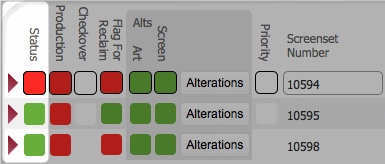
Specifically, screen-sets in any of the following statuses:-
Each image for a print screen process, requires an artwork and a related set of screens - a "screen-set" to facilitate the screen printing of the artwork onto a garment.
By default, the Stencils Required layout, shows screen-sets which are required for usage on upcoming job-orders.
This topic will instruct you how to interrogate the Screens Required layout to identify a screen-set that requires one or more screens to be made.
Ensure that:-
|
Screen Set status |
Colour |
Meaning |
|
|
Red |
No screens in the screen-set exist. |
|
|
Amber |
At least one of the screens in the screen-set is in the process of being manufactured. |
|
|
Sky Blue |
Although manufactured, the screen-set requires checking. |
|
|
Pink |
The screen set has been washed and is filed as a partial set (that is, one or more screens in the set are missing / damaged and will require manufacture before the set can be used again.) |
|
|
Dark Pink |
Following on from the partial set status, above, when one more screens in a set are missing, and the whole set is required on a another job, the missing screen(s) will need to be manufactured before the job can be done. Whilst, this re-manufacture occurs, the partial set is placed in the part check area to await the replacement(s) to be made, and then the whole set is reconciled and subject to a final check before being used again.. The Dark pink status indicates the partial set is in part check awaiting the manufacture of the missing screens. |
|
Note: If a screen splits during a print production job, then the screen-set record status will flash on and off to denote the urgency with which it needs to be addressed - see dealing with splits during a print run for more. |
||
have one or more screens that are potentially not yet made.
Related Topics
Screen and Screen-Set Record Statuses
Viewing the Detail on a Screen-Set Record


